
ApacheConf - easy configuring your Apache servers
ApacheConf is the shell for configuring Apache web servers. ApacheConf represents all the information from the httpd.conf file, from the included files, from the log files, .htaccess, .htpasswd and .htgroup in the structured view. All of the server's directives are grouped by category and all these groups are represented as a tree. Also all the server logs, .htaccess files, password files of your users, etc. are available only by one mouse click. In this way, you can see the entire structure of the server at once and you can easily manage all of the server's directives as well as the directories and virtual hosts. ApacheConf is a complete "control center" of Apache web server.
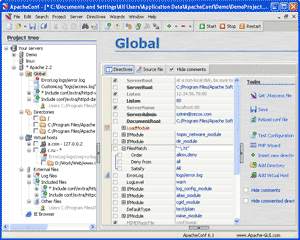 A good Apache web server configuration GUI is a great way to introduce you to Apache and using the Apache web server configuration GUI is faster and easier than configuring Apache server by hand.
ApacheConf has the descriptions all of the server's directives and parameters. You can easily get help about any directive at any time. It helps the beginner to quickly master the Apache web server and it will provide a real tutorial for you. For the experienced user it is an indispensable administrative tool that is often used in professional webhosting solutions.
ApacheConf has a number of features that allow you to edit your httpd.conf and to manage your server easily and quickly, making your work more efficient and orderly.
- Represents all the information of Apache's main configuration file in a structured view. All of the server's directives are grouped by category (Global directives, Directories, Virtual hosts, etc) and all these groups are represented as a tree for easy access.
- Work with several web servers.
- Interaction with your Apache server. You can start, stop or restart an Apache server on local computer or on remote computer easily and quickly. In the current version ApacheConf can control of remote servers working under MS Windows, Novell Netware, and *nix (Unix/Linux/FreeBsd).
- Editing httpd.conf file using GUI and by manually in special editor with syntax highlighting, bookmarks, line numbers, code folding.
- Quick start, stop and restart the Apache web server.
- Downloading and uploading the configuration files directly from(to) remote server via SSH or FTP connections.
- Automatic loading of the external configurations files, such as files from the 'Include' directive, .htaccess files, .htpasswd, .htgroup, CustomLog and ErrorLog files.
- ApacheConf has the full description of the all the directives that might be present in httpd.conf. This gives you easy access to help in using Apache which is especially useful for beginning web administrators.
- SSI Wizard.
- PHP Wizard.
- Editing the .htaccess files.
- Editing the .htpasswd files.
- Editing the .htgroup files.
- Viewing CustomLog for every virtual host separately.
- Viewing ErrorLog for every virtual host separately.
- Wizard for directory locking.
- Quick test of the configuration file on correctness.
- Embedded MS Internet Explorer for every Apache server.
- ApacheConf has special managers for easily managing some of Apache's directives (LoadModule, Alias directives, ErrorDocument, language directives, charsets directives, etc).
- You can quickly switch to the text source of httpd.conf and the current active directive will be selected automatically. This way you can always compare how the program represents the text from the configuration file.
- ApacheConf shows a warning message when an invalid directive is used.
ApacheConf will make web administrator's work much more effective and pleasant!
ApacheConf screenshots Download ApacheConf